Your audience finds answers in both Google search results and AI platforms, so tracking keywords and prompts separately leaves gaps in your view of visibility. Organic Rankings 2.0 groups related keywords and prompts into topics and shows how a domain performs for each topic across Google search and AI search. You see a brand's visibility for a whole subject at once, instead of piecing it together keyword by keyword.
Understanding Organic Rankings 2.0
Use Organic Rankings 2.0 to:
- Benchmark your domain or a competitor's domain at the topic level
- Find topics your competitors own that you don't compete for yet
- Estimate the traffic your visibility brings, from both organic search and AI platforms
- Track topic visibility over time
Accessing Organic Rankings 2.0
- Go to SEO > Organic Rankings 2.0
- Enter a domain in the search bar
- Click Analyze
- Select the US or UK database
- Select the month from the date dropdown next to the database
Key metrics and visualizations
Domain summary
The top of the report shows the domain's totals across all the topics it competes for.
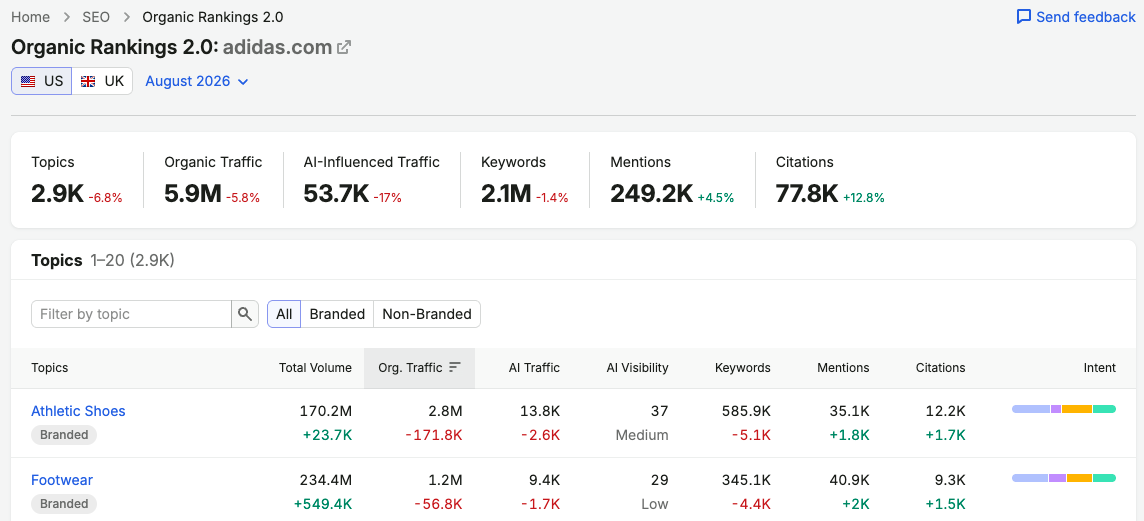
Use these totals to see the scale of a domain's visibility across Google search and AI platforms before you look at individual topics:
|
Metric |
Definition |
|
Topics |
The number of topics the domain competes for |
|
Organic Traffic |
Estimated monthly visits from the domain's Google organic rankings, across all its topics |
|
AI-Influenced Traffic |
An estimate of how many visits to the brand's website, from any channel, were influenced by the brand being mentioned by AI platforms, across all the domain's topics |
|
Keywords |
The number of keywords the domain ranks for, across all its topics |
|
Mentions |
The number of times AI platforms mention the brand in answers to the topics' prompts |
|
Citations |
The number of times AI platforms cite the domain as a source in those answers |
Each total shows its percentage change from the previous period. A rise in Mentions or Citations with flat Organic Traffic, for example, shows that the domain's visibility is growing on AI platforms rather than in Google search.
Topics
Each topic in this report is a group of related keywords and prompts.

The table shows these columns for each topic:
- Total Volume: The combined volume of all keywords and prompts within the topic
- Org. Traffic: Estimated monthly visits from the domain's Google organic rankings within the topic. See Organic Traffic.
- AI Traffic: An estimate of how many visits to the brand's website, from any channel, were influenced by the brand being mentioned by AI platforms for the topic. See AI-Influenced Traffic.
- AI Visibility: A score for the brand's presence in AI-generated answers within the topic, with a label such as Low or Medium
- Keywords: The number of keywords the domain ranks for in Google's top 100 organic results within the topic
- Mentions: The number of times AI-generated answers mention the brand within the topic
- Citations: The number of AI responses that cite the domain as a source within the topic
- Intent: The search intent behind the topic’s keywords, shown as a distribution within the topic
Each value shows its change below it. A Branded label marks topics tied to the domain's brand. To narrow the list, type in Filter by topic or select All, Branded, or Non-Branded. To sort the table, click a column header.
Topic details
Click a topic in the table to open its details. Use the trend to check whether a campaign around the topic moved your visibility.
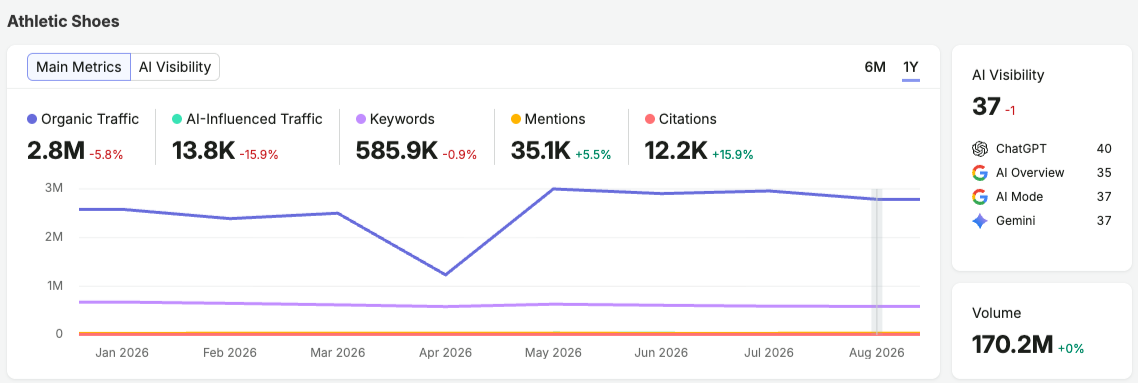
The topic view has 2 tabs, and you can switch the chart period on either with 6M or 1Y.
The Main Metrics tab shows the domain’s visibility metrics for this topic: Organic Traffic, AI-Influenced Traffic, Keywords, Mentions, and Citations, each with its change over the period, plus a trend chart.
The AI Visibility tab shows the domain’s trend of AI Visibility across the specific topic and the score on each AI platform: ChatGPT, AI Overview, AI Mode, and Gemini.
Volume shows the topic's total volume, with its change over the period.
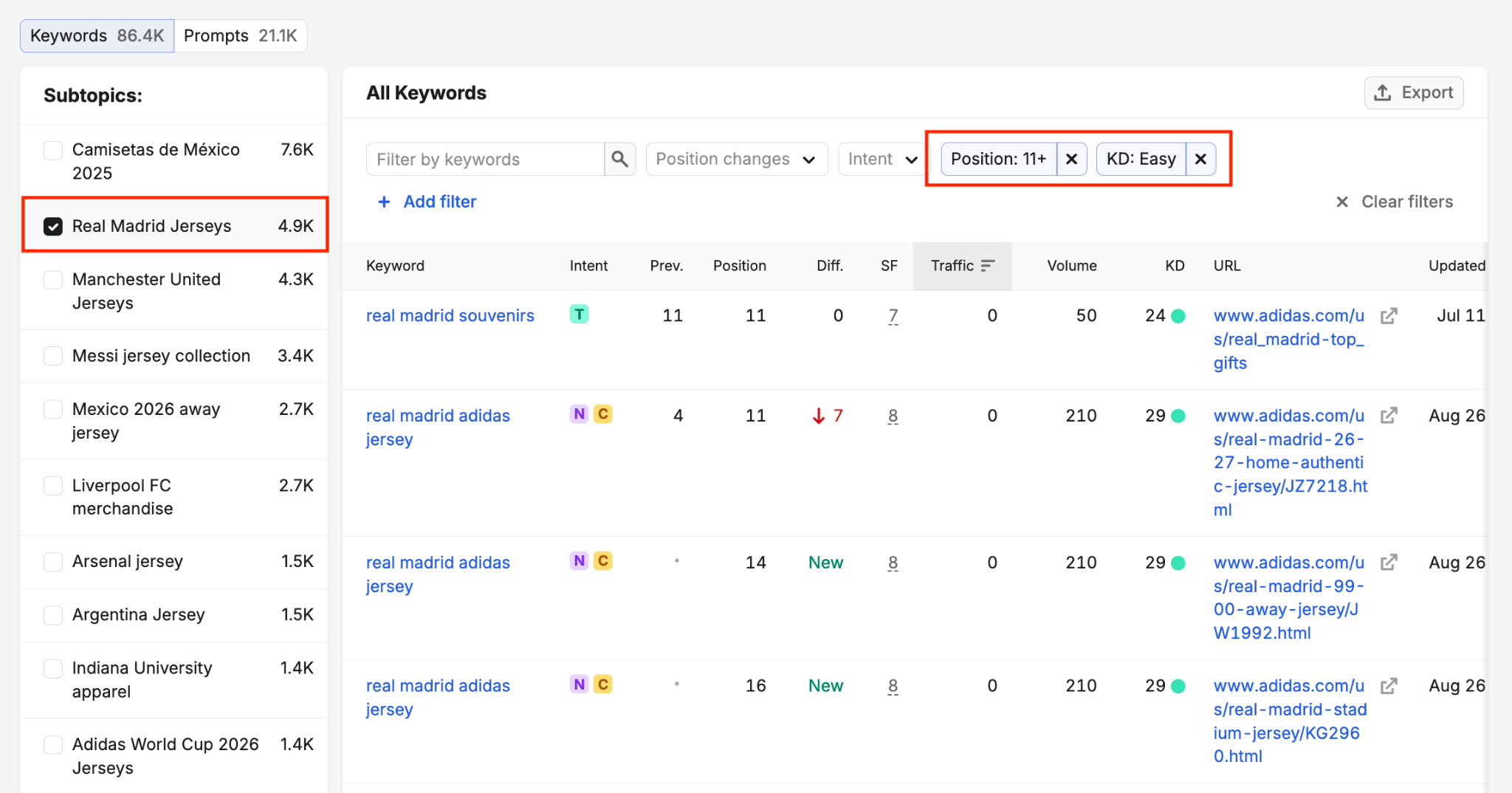
Below the chart, a table lists the keywords and prompts that make up the topic, along with metrics to check the domain’s visibility across each keyword and prompt.

To see only the keywords and prompts in a subtopic, select its checkbox under Subtopics.
Narrow the Keywords list with Filter by keywords, Position changes, or Add filter for position, keyword difficulty, volume, or intent. Use these filters to find keywords in your target subtopic where you could still improve visibility. For example, filter for low keyword difficulty and positions 11–100 to find low-competition keywords.
Narrow the Prompts list by Mentioned or Cited, by New or Lost, or by platform with All AI platforms.
Export keywords and prompts
- Click Export above the Keywords or Prompts table
- Select All to export up to your plan's limit, or select First and choose the number of rows
- Click Export to CSV
After you export, use the CSV file to:
- Track the keywords or prompts in Position Tracking and Prompt Tracking
- Add the keywords to a saved keywords list
- Analyze the data in your AI tool of choice
Taking action
Benchmark your competitor's topic visibility
A competitor's metrics on a shared topic show the level of visibility you need to match. Compare both domains on the same topic to see where they lead and why.
- Enter your competitor's domain in Organic Rankings 2.0
- Open a topic you both compete for
- Note their Organic Traffic, AI-Influenced Traffic, Mentions, Citations, and Keywords for that topic
- Repeat with your own domain and compare the 2 sets of metrics
- Set the competitor's metrics as your benchmark for that topic
For example, zennioptical.com and warbyparker.com both compete for the topic Prescription Eyeglasses.
Here’s Zenni Optical’s visibility trend for the topic.

And to compare, here’s Warby Parker’s visibility trend for the same topic.

Zenni Optical ranks for fewer keywords but leads in organic traffic and AI-influenced traffic.
Warby Parker has more AI citations, but Zenni Optical has more AI mentions, which likely brings it more AI-influenced traffic. For Warby Parker, this benchmark shows the gap to close in mentions, organic traffic, and AI-influenced traffic.
Frequently asked questions
Organic Rankings 2.0 is different from the legacy report because it groups keywords and prompts into topics, instead of listing individual keywords. It also shows visibility in AI search alongside Google search, and estimates organic traffic with an updated model that accounts for search intent, SERP features, and AI Overviews. Because of this, its organic traffic estimates differ from the legacy report’s. See Organic Traffic.